
What can be build with AI-assisted “vibe coding”? Some example projects from the last 2 years…
DeepRedStories: Chess with a Voice
 DeepRedStories turns historical chess games into narrated experiences, pairing an animated chessboard with AI-generated audio commentary. Inspired by the fictional DEEP RED AI of a Martian utopia, its deep-voiced, Russian-accented narrator adds a distinctive personality to the moves and stories.
- ✓ Animated game replay synchronized with spoken commentary.
- ✓ Random game selection, playback controls, and automatic continuation.
- ✓ Pre-generated audio and a static website, with no runtime application backend.
Technology focus: Python data pipelines, Coqui XTTS v2 text-to-speech, JavaScript, chess.js, and chessboard.js.
GitHub: ferzkopp/DeepRedStories
PixooCtrl: Small Display, Plenty of Personality
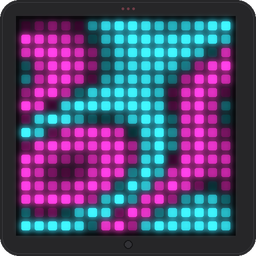 PixooCtrl gives me direct control of a Divoom Pixoo 16×16 LED display over Bluetooth, without relying on the vendor’s app. Alongside a reusable Python library, it includes a collection of tiny animations and self-playing games that make good use of just 256 pixels. Running in the office now.
- ✓ Pixel drawing, image and GIF transfer, brightness, and display-mode controls.
- ✓ Lava-lamp, plasma, starfield, and rain effects, plus auto-playing Snake and Flappy Bird demos.
- ✓ On-screen simulation and image previews for experimenting without the hardware.
Technology focus: Python, Pillow, Bluetooth Classic/RFCOMM, and low-resolution graphics, with setup helpers for Windows and Linux.
GitHub: ferzkopp/PixooCtrl
VantaMCPd: Give Your Agent a Cluster
 VantaMCPd puts a collection of Linux machines—including small ARM boards and more powerful x86 systems—to work through one Model Context Protocol (MCP) interface. Instead of manually juggling SSH sessions and machine-specific tools, an AI agent can discover capabilities, manage nodes, and use modules suited to the available hardware. Fantastic tool to manage a Linux cluster as well.
- ✓ Cluster inventory, health checks, logs, package and service management, and background jobs.
- ✓ Installable modules (browser, search, computing, image processing, ray tracing, and OCR.
- ✓ Shared artifact storage and capability-aware module deployment and routing.
Technology focus: TypeScript, Node.js, MCP, SSH, and modular distributed workloads on Debian/Armbian nodes.
GitHub: ferzkopp/VantaMCPd
WS-PanTilt: Bringing a Camera Rig Under Control
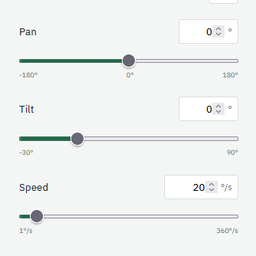 WS-PanTilt provides command-line tools, a Python API, and optional browser controls for a Waveshare two-axis pan-tilt camera module. It connects the Raspberry Pi’s camera capabilities with an ESP32-based robot driver board, making movement, capture, and hardware feedback accessible from one toolkit on a current Python release.
- ✓ Pan, tilt, jog, home, stop, and stabilization controls.
- ✓ Photo and video capture, plus browser-based camera snapshots.
- ✓ LED and OLED controls, sensor readings, hardware diagnostics, and dry-run support.
Technology focus: Python, Raspberry Pi 5, UART/pyserial, Picamera2 and rpicam, with Flask and Waitress for the web interface.
GitHub: ferzkopp/WS-PanTilt
tiny-thinker: A Classroom LLM Playground
 Tiny Thinker makes AI something students can experiment with rather than simply ask for answers. Small, open language models run directly in the browser, while guided activities explore prompting, creativity, invented facts, bias, language, and reasoning. No account or inference server is required, and questions and replies are processed on-device; model and library downloads still use the network.
- ✓ Fourteen classroom experiments, plus free chat.
- ✓ Adjustable prompts and temperature, downloadable reflection notes, and experiment badges.
- ✓ A Turtle artist activity that generates drawings through editable Logo code.
Technology focus: Static HTML, CSS, and JavaScript; WebLLM and wllama; WebGPU and WebAssembly CPU inference.
GitHub: ferzkopp/tiny-thinker
BusyUserBot: An AI-Driven Desktop Test User
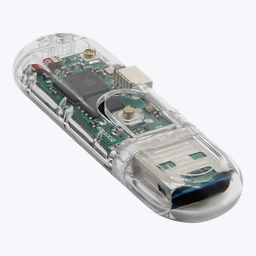 BusyUserBot explores how to simulate varied desktop activity for testing, demos, and stress scenarios. A Windows controller captures screenshots and asks a vision-capable AI model what to do next, then sends keyboard and mouse actions over Bluetooth LE to a physical USB dongle. It is an experimental scaffold, not a proven unattended automation system, and belongs on a dedicated test machine or disposable environment.
- ✓ Separate AI planning, validation, and execution stages.
- ✓ Physical USB keyboard and mouse input through an ESP32-S3 dongle.
- ✓ Local or cloud AI backends, configurable scenarios, and dry-run and fake-AI development modes.
Technology focus: C#/.NET 8 WinForms, vision-language models through LM Studio or Azure OpenAI, BLE GATT, and ESP32-S3 Arduino USB HID firmware.
GitHub: ferzkopp/BusyUserBot
TapoSwitch: Smart-Plug Control from the Windows Tray
 TapoSwitch tackles a small, practical annoyance: switching external audio equipment or other desk hardware on and off without reaching for a phone. This lightweight Windows tray application controls a single TP-Link Tapo plug or switch and ties power-off behavior to the computer’s shutdown and logoff lifecycle.
- ✓ One-click on/off control with a device-state tray icon.
- ✓ Optional startup at login and automatic power-off on logoff, shutdown, or application exit.
- ✓ Reconnection retries and an interactive installation helper.
Technology focus: C#/.NET 9 WinForms, TapoConnect, SecurePassthrough and KLAP protocols, and PowerShell installation tooling.
GitHub: ferzkopp/TapoSwitch
Disclaimer: In good vibe-coding manner, everything here — from code and documentation to this article and its featured image — was AI-generated, with the ideas, direction, and final decisions guided by me.